
Color-Blind Friendly Feature Flag Indicator
Overview
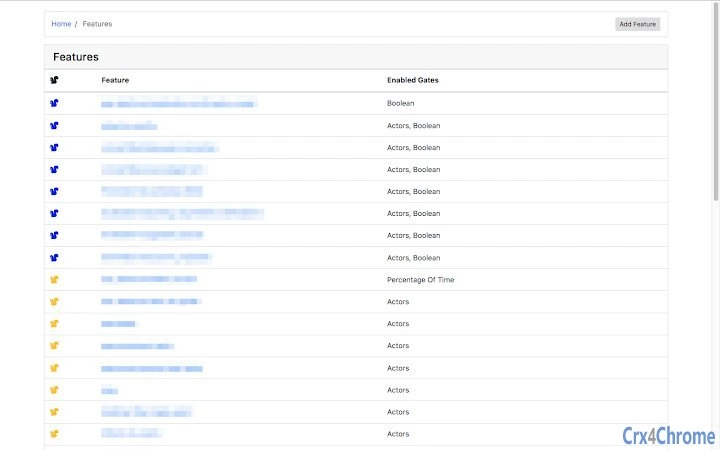
The software is designed to address a specific accessibility challenge in software development workflows by modifying the visual indicators for feature flags. It changes green deployment indicators to blue, making it easier for individuals with color vision deficiency to distinguish between partially deployed and fully deployed states. This adjustment supports inclusive design practices in development environments where visual feedback is critical.
Target users include developers, product managers, and QA teams working with feature flag systems, particularly those who are color blind or work in teams with color vision impaired colleagues. The tool operates as a browser extension, integrating directly into web-based development dashboards and monitoring tools where feature flag statuses are displayed.
By altering color cues without modifying underlying data or functionality, the software maintains compatibility with existing workflows. It enables clearer visual communication in environments where color accuracy is essential for decision-making. The developer did not provide additional details about the origin or background of the tool.
Key Features & Capabilities
- Color Scheme Adjustment – Transforms green deployment indicators to blue, improving visibility for users with color vision deficiency.
- Non-Invasive Integration – Functions as a browser extension that overlays changes on existing dashboards without altering backend systems.
- Accessibility-First Design – Prioritizes usability for individuals with color vision deficiency, supporting inclusive development practices.
- Real-Time Visual Feedback – Applies changes dynamically as feature flag statuses update, ensuring consistent visibility.
For example, in a development dashboard where green indicates full deployment and yellow or light green indicates partial deployment, the tool reassigns the color coding to blue for full deployment and a different hue for partial states. This helps users quickly interpret status without relying on color alone.
The tool supports workflows in agile environments, continuous integration pipelines, and A/B testing platforms where feature flag visibility is critical. It enhances clarity without requiring changes to the host application or additional configuration.
User Interface, Workflow & Performance
The interface is minimal and designed for seamless integration within browser environments. As a browser extension, it operates in the background with no visible UI elements, reducing visual clutter and maintaining focus on the host application.
Navigation is automatic—once installed, the extension applies its color modifications immediately. Users do not need to configure settings or select specific dashboards, as the tool detects and modifies relevant elements across supported platforms.
Performance behavior is not detailed in the provided information. The developer did not specify resource usage details. General software behavior suggests low CPU and memory overhead, typical of lightweight browser extensions. Stability is expected to be consistent with standard extension frameworks, though exact performance metrics were not provided.
Compatibility & System Requirements
The software is compatible with Windows, Mac, and Linux operating systems, supporting modern web browsers used in development workflows. It is designed to function across different platforms where browser-based development tools are accessed.
The installation size is 1.5 MB, indicating a lightweight footprint. This suggests minimal impact on system resources during installation and runtime. Exact system requirements were not listed, and no hardware specifications were provided.
Compatibility with specific browser versions or development dashboards was not specified. Users should ensure their browser supports extensions and has the necessary permissions enabled for such tools.
Pros and Cons
Pros
- Improves accessibility for users with color vision deficiency
- Lightweight with a small installation size (1.5 MB)
- Easy to install and use—no configuration required
- Non-invasive; works with existing feature flag dashboards
- Free to use with no licensing restrictions
Cons
- Does not support custom color schemes or user-defined adjustments
- Functionality limited to visual color changes; no additional accessibility features
- Compatibility with specific dashboards not confirmed
- No advanced settings or customization options
- Developer background not disclosed
FAQ Section
Is this software compatible with all web-based feature flag dashboards?
Compatibility depends on the dashboard’s implementation and how it renders color indicators. The tool is designed to work with common platforms but may not function on all systems.
Does the software require an internet connection to work?
Once installed, the extension operates offline. It modifies visual elements locally, so an active internet connection is not required for functionality.
Is the software safe to use?
As a browser extension, it operates within the browser’s security model. No data is transmitted externally. Users should only install from trusted sources.
How often are updates released?
Update frequency was not specified. Users should check the extension store for the latest version and release notes.
Can I customize the color scheme?
Currently, the software only changes green indicators to blue. Custom color options or alternative palettes are not supported.
Final Thoughts
This tool offers a focused, practical solution for improving accessibility in software development environments. By addressing a common visual challenge for color-blind users, it enhances clarity and reduces the risk of misinterpretation in critical workflows. Its lightweight design and zero cost make it accessible to a broad audience.
While it lacks advanced customization, its simplicity is a strength—users get immediate benefit without configuration. It is especially valuable for teams committed to inclusive design and accessibility compliance.
Download Color-Blind Friendly Feature Flag Indicator now







